
Run your daily, weekly, monthly, adjustment loans without a paper ledger.
Insofs Finance Management replaces the register and the calculator — track every collection, adjustment and due date from one place, built for how local financiers actually work.
| Date | Customer | Cycle | Collected | Balance |
|---|---|---|---|---|
| 08 Sep | Ramesh K. | Daily | ₹500 | ₹4,500 |
| 08 Sep | Lakshmi S. | Weekly | ₹1,200 | ₹8,800 |
| 07 Sep | Suresh P. | Monthly | ₹3,000 | ₹27,000 |
| 07 Sep | Meena R. | Daily | ₹300 | ₹2,700 |
Everything a local loan book needs, in one place.
Six things Insofs handles so you don't have to do them by hand — see the full picture on the About Software page.
All four kinds of lending
Daily, weekly and monthly instalment loans — and interest-only adjustment loans where the principal stays out. One system, no separate register for each.
The arithmetic does itself
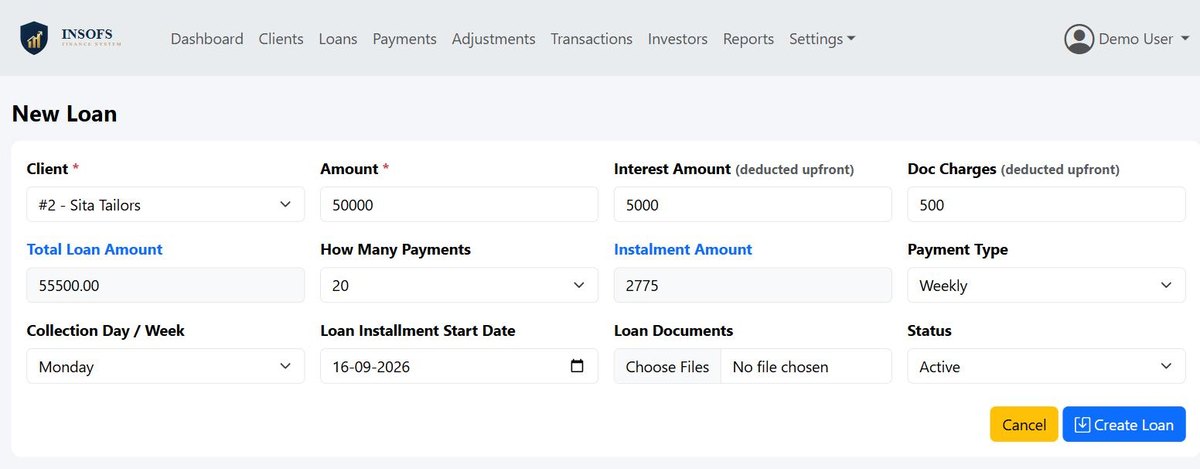
Enter the amount given, the interest and the doc charges — the instalment, the end date and the repayable total are worked out for you. Adjustment interest accrues day by day on what is actually still owed.
The day's run sheet, on a phone
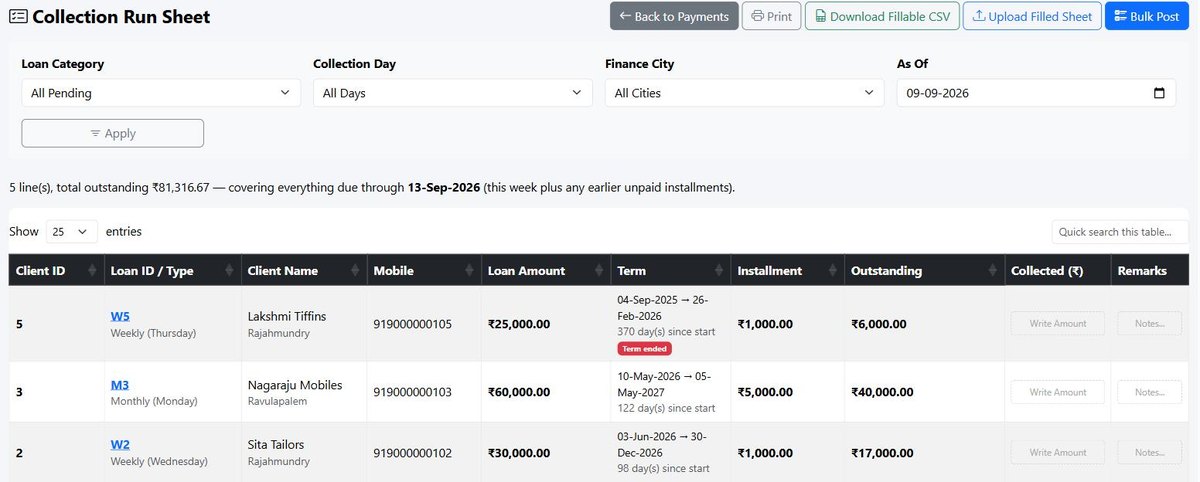
Pick the town and the collection day and the list is ready — your agent opens it in the phone's browser, nothing to install. Post the whole round in one screen in the evening.
Reports you can hand to an auditor
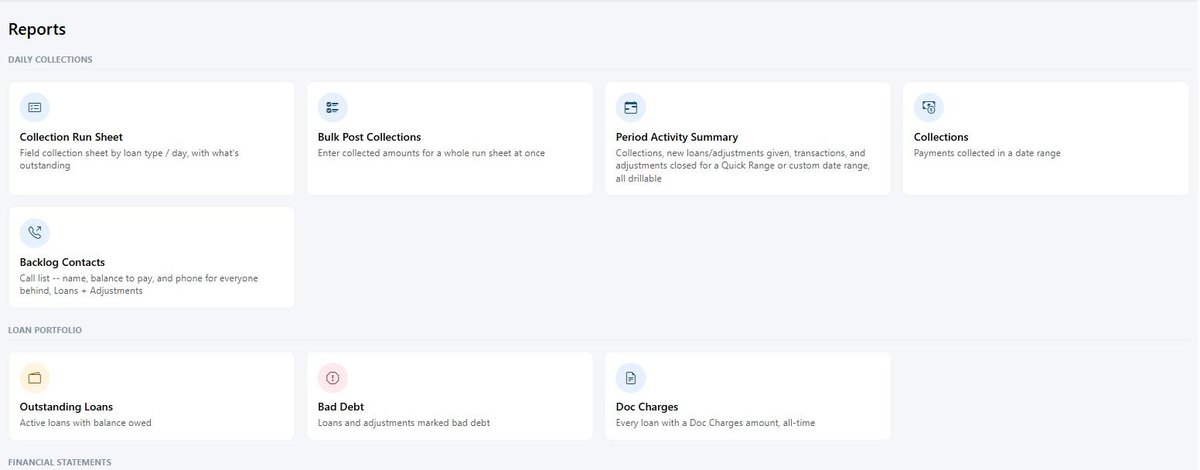
Outstanding loans, the day's call list, collections, cash flow, bad debt, yearly profit & loss and trial balance. Every one printable and exportable to Excel.
WhatsApp reminders in Telugu
One button opens WhatsApp with the reminder already typed — name, principal, balance, months overdue — in Telugu and English. You read it and press Send. No API, and no charge per message.
Photograph the Aadhar card
Take a photo of the card and the name, number and address fill themselves into the form — then you check them. The same Aadhar number can never be registered against two clients by mistake.
Real screens, not drawings.
Three screens straight out of the live demo. Every name and figure in them is made up for the demo — open it yourself and the same screens are there to click through.
Watch it in 25 seconds
A short film in Telugu and in English — the New Loan screen doing its own arithmetic, and a WhatsApp reminder going out in the customer's language. Download either one and forward it.
Watch the videosOr log in and use it yourself
A full copy is running at demo.insofs.com with sample customers, loans and collections already in it. The login is printed on its own login page — nothing to sign up for, nothing to pay.
Open the live demoThree ways the data gets in — and none of them is typing it twice.
A camera, a spreadsheet, or the screen itself. Whichever suits the person doing the work.
eKYC-style onboarding from the card itself
Photograph the client's Aadhar card on the Add Client screen and the name, Aadhar number and full address are read off it and written into the form — then you check them before saving. The card image is filed against the client at the same time, so the proof and the record arrive together.
- The number is checksum-verified — a mistyped or invented Aadhar is refused.
- The same Aadhar can never be registered twice, so one person cannot end up with two accounts by accident.
- Aadhar address and living address are kept as separate fields — because plenty of clients do not live at the card address.
To be exact about it: this reads the card and fills the form. It does not contact UIDAI, so it is not an authenticated eKYC — it removes the typing and the typos, and files the document.
Post the whole day from a photo of the paper sheet
Your agent still carries the printed run sheet and still writes the amounts on it in pen — nothing about their day changes. Back at the office, photograph the filled sheet and upload it. The handwriting is read line by line, matched to the right loan, and the collection grid comes up with the amounts already entered.
- The office checks and corrects the grid — it is a normal editable screen, not a black box.
- Nothing reaches the ledger until you press Confirm. A misread digit is caught before it becomes a payment.
- Prefer a keyboard to a camera? Download the same sheet as a fillable CSV, type the amounts in Excel, and upload that instead.
Reading the handwriting needs a Google Cloud Vision key, which takes about five minutes to set up once and is free for the first 1,000 sheets a month. Without it the CSV route and the on-screen grid both work exactly as normal.
Your existing book comes across in a spreadsheet
Clients, loans, adjustments, payments, transactions and users each have their own Import CSV and Export CSV. That is how a business already running on Excel — or on another piece of software — moves in without retyping years of records.
- Import in order: clients, then loans, then payments — each one refers back to the last.
- A row whose ID already exists is skipped, not duplicated, so a half-finished import can simply be run again.
- Export works the same way in reverse — every list and report leaves as CSV for your auditor, your partner, or your own spreadsheet.
It is also your exit. The data is yours, it leaves in a format anything can read, and there is no fee for taking it.
Made for how finance is actually run here.
Not a foreign banking product with Indian labels stuck on it.
Telugu on every screen తెలుగు
Menus, headings and buttons switch to Telugu for the staff who prefer it — and stay in English for the office. It is saved per person, so the same system reads both ways at once.
Interest the way you quote it
Rates are entered as rupees per hundred, per month — 2.25 means 2.25%, exactly as it is said across the counter. Each investor can have their own rate.
Your towns, your collection days
Run Rajahmundry, Ravulapalem, Kakinada and Tadepalligudem from one login, and give each agent only their own town. Filter the run sheet to Monday, Wednesday or whichever day you collect.
The adjustment loan, understood
Most software has never heard of an interest-only loan where the principal stays out. This one treats it as a product in its own right — monthly, three-monthly, six-monthly or yearly interest, accrued day by day.
April to March
Every yearly figure — profit & loss, investor capital, interest settlement — runs on the Indian financial year, not a January calendar.
It runs on ordinary hosting
The same shared hosting that runs a small business website. No cloud bill, no server to buy, no IT person. Your data sits in your own database and you can download a copy any day you like.
Four steps, same as your paper ledger — just faster.
Open the account
Add the borrower in one form — photograph their Aadhar card and most of it fills itself in.
Record the collection
Daily, weekly or monthly — you or your agent enters the payment on the spot.
Let it calculate
Interest, adjustments and running balance update automatically.
Track and follow up
Reports show who is behind and by how much; one tap sends them a WhatsApp reminder in Telugu.
See what it costs to move your book digital.
One flat setup fee, one small annual renewal — no per-transaction charges.